awesome ! it works … yepee … I’m able to add Material UI button directly in plasmic studio … now I need to figure out how I can change the button label … I guess I haven’t registered all the props I need (only exposed “variant”)
You can probably expose the prop children as a slot (or label, I don’t know how it is set up in material UI)
yes that’s what I found in the MUI API doc
children
don’t you have “standard”/template registration call for most used UI components from major libraries ?
(happy to recode everything but  )
)
One additional question, I assume that the registration calls are only important for the Plasmic Studio to work, I could remove them from what gets deployed in production ?
You could remove them, but it would stop working in studio and you wouldnt be able to edit the site correctly anymore 
We don’t have anything for material UI, but we have chakra UI and antd registrations. You can check all the registrations we currently have in here
https://github.com/plasmicapp/plasmic/tree/master/plasmicpkgs
Maybe if you ask in general someone might be willing to share their registrations for material UI
Great ! I will have a look.
I try to register a prop called “size” for which only a choice from 3 values is possible but it gives a registration error.
registerComponent(Button, {
name: “Button”,
props: {
variant: “string”,
children: “string”,
color: “string”,
href: “string”,
size: [“small”, “medium”, “large”] },
displayName: “MUIButton”,
description: “Button component of the Material UI library”,
importPath: ‘@mui/material’,
isDefaultExport: true
});
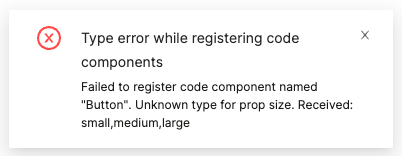
You can check here the available prop types:
https://docs.plasmic.app/learn/code-components-ref/#prop-types
For this case, what you want to do is:
size: {
   type: "choice",
   options: ["small", "medium", "large"]
}
Ok thanks … I was too quick to ask you and found the information as well … that’s because you are too fast to answer me and I got lazy … thanks