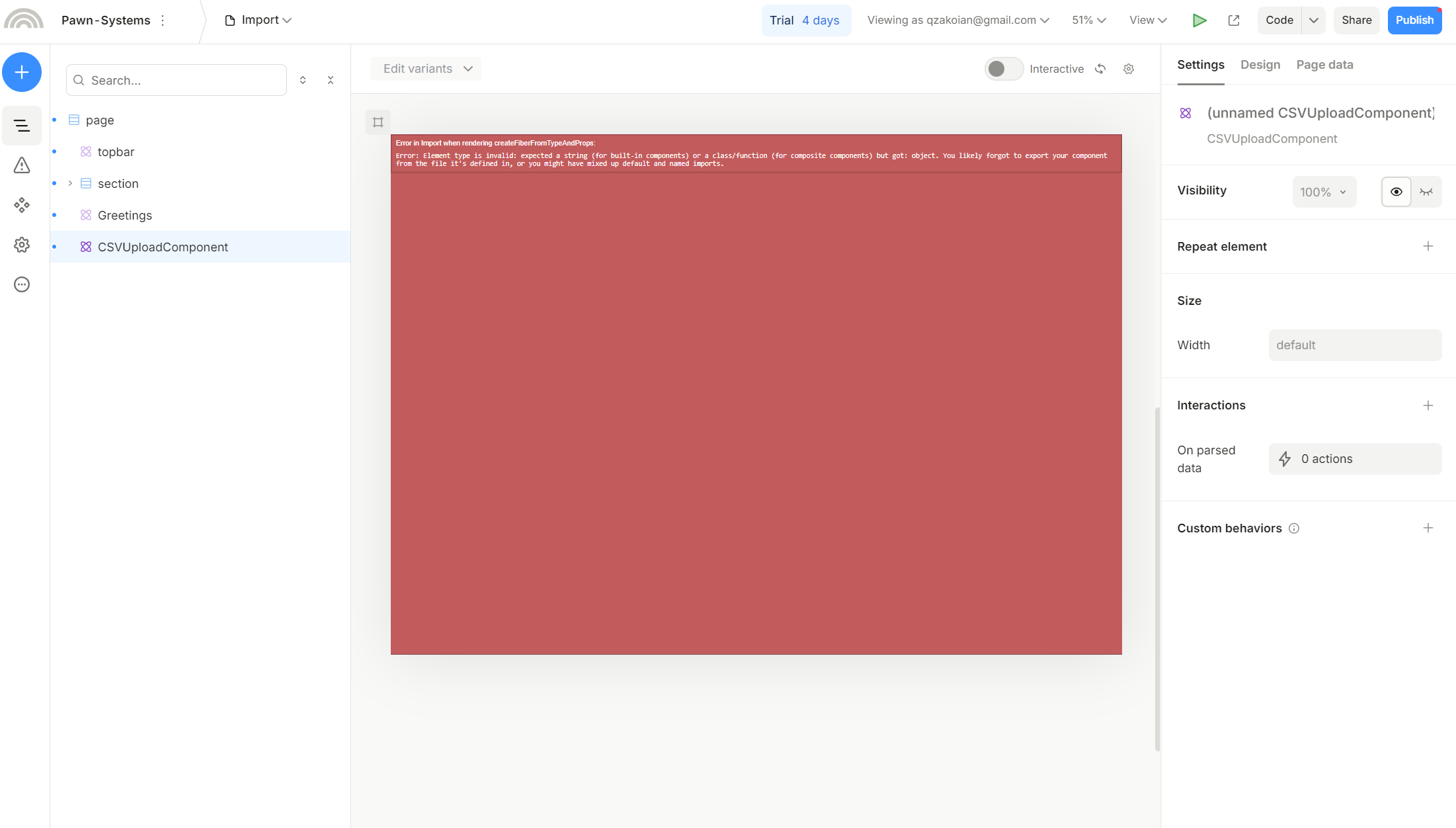
I am trying to register a component to handle csv upload, but it seems I am not registering my component correctly…
Here is my /components/CSVUploadComponent.js
import React from 'react';
import Papa from 'papaparse';

function CSVUploadComponent({ onParsedData }) {
  const handleFileUpload = (event) => {
    const file = event.target.files[0];
    if (file) {
      Papa.parse(file, {
        header: true,
        complete: function (results) {
          const data = results.data;
          onParsedData(data);
        },
        error: function (error) {
          console.error("Error parsing CSV: ", error);
        }
      });
    }
  };

  return (
    <div>
      <input
        type="file"
        accept=".csv"
        onChange={handleFileUpload}
        style={{ display: 'none' }}
        id="fileInput"
      />
      <button onClick={() => document.getElementById('fileInput').click()}>
        Upload CSV
      </button>
    </div>
  );
}

export default CSVUploadComponent;
Here is my /pages/plasmic-host.jsx
import * as React from 'react';
import { PlasmicCanvasHost, registerComponent } from '@plasmicapp/react-web/lib/host';
import CSVUploadComponent from "../components/CSVUploadComponent";

// You can register any code components that you want to use here; see
// https://docs.plasmic.app/learn/code-components-ref/
// And configure your Plasmic project to use the host url pointing at
// the /plasmic-host page of your nextjs app (for example,
// http://localhost:3000/plasmic-host).  See
// https://docs.plasmic.app/learn/app-hosting/#set-a-plasmic-project-to-use-your-app-host

// registerComponent(...)


registerComponent(CSVUploadComponent, {
  name: "CSVUploadComponent",
  props: {
    onParsedData: {
      type: "eventHandler",  // Correctly specify the prop type as a function
      argTypes: [],      // You can specify the types of arguments if needed, or leave it empty
      description: "Function to handle parsed data from the CSV upload", // Optional: Add a description
    },
  },
  importPath: "../components/CSVUploadComponent",  // Ensure the correct import path
});

const PlasmicHost = () => {
  return <PlasmicCanvasHost />;
}

export default PlasmicHost;
And when I try to add the component in the Studio, I get a red screen with the error :
Error in Import when rendering createFiberFromTypeAndProps:
Error: Element type is invalid: expected a string (for built-in components) or a class/function (for composite components) but got: object. You likely forgot to export your component from the file it’s defined in, or you might have mixed up default and named imports.
Any idea what I am doing wrong?
Hello @quentin_zakoian,
Since you’re using a default exported component, you need to specify the isDefaultExport flag in the registration. You can check the API here Code components API reference | Learn Plasmic
Hi @icaro_guerra,
Thank you so much for your help!
Sadly I updated my registerComponent like so :
registerComponent(CSVUploadComponent, {
  name: "CSVUploadComponent",
  importPath: '@/components/CSVUploadComponent',  // Ensure the correct import path
  isDefaultExport: true,  // Indicate that the component is a default export
  props: {
    onParsedData: {
      type: "eventHandler",  // Correctly specify the prop type as a function
      argTypes: [],      // You can specify the types of arguments if needed, or leave it empty
      description: "Function to handle parsed data from the CSV upload", // Optional: Add a description
    },
  },
});
Adding the
isDefaultExport: true,
And yet I am still having exactly the same problem in the studio 
Any idea why?
Can you try adding importName too?
Hi @icaro_guerra,
Thanks for your reply, I added importName like so:
registerComponent(CSVUploadComponent, {
  name: "CSVUploadComponent",
  importPath: './components/CSVUploadComponent',  // Ensure the correct import path
  importName: "CSVUploadComponent",
  isDefaultExport: true,  // Indicate that the component is a default export
  props: {
    onParsedData: {
      type: "eventHandler",  // Correctly specify the prop type as a function
      argTypes: [],      // You can specify the types of arguments if needed, or leave it empty
      description: "Function to handle parsed data from the CSV upload", // Optional: Add a description
    },
  },
});
Still getting the same red screen
Can you try changing your component file from .js to .jsx?
1 Like
I don’t really know if it was that, because I looked again in the Studio and this time it worked even tho I didn’t change anything from before, but maybe I did try the .jsx switch, and then not checked correctly, I don’t know…
Anyway, so far it works with this:
components/CSVUploadComponent.jsx
import React from 'react';
import Papa from 'papaparse';

function CSVUploadComponent({ onParsedData }) {
  const handleFileUpload = (event) => {
    const file = event.target.files[0];
    if (file) {
      Papa.parse(file, {
        header: true,
        complete: function (results) {
          const data = results.data;
          onParsedData(data);
        },
        error: function (error) {
          console.error("Error parsing CSV: ", error);
        }
      });
    }
  };

  return (
    <div>
      <input
        type="file"
        accept=".csv"
        onChange={handleFileUpload}
        style={{ display: 'none' }}
        id="fileInput"
      />
      <button onClick={() => document.getElementById('fileInput').click()}>
        Upload CSV
      </button>
    </div>
  );
}

export default CSVUploadComponent;
And plasmic-host.jsx
import * as React from 'react';
import { PlasmicCanvasHost, registerComponent } from '@plasmicapp/react-web/lib/host';
import CSVUploadComponent from '../components/CSVUploadComponent.jsx';
import Greetings from '@/components/Greetings';


// You can register any code components that you want to use here; see
// https://docs.plasmic.app/learn/code-components-ref/
// And configure your Plasmic project to use the host url pointing at
// the /plasmic-host page of your nextjs app (for example,
// http://localhost:3000/plasmic-host).  See
// https://docs.plasmic.app/learn/app-hosting/#set-a-plasmic-project-to-use-your-app-host

// registerComponent(...)


registerComponent(CSVUploadComponent, {
  name: "CSVUploadComponent",
  importPath: './components/CSVUploadComponent',  // Ensure the correct import path
  importName: "CSVUploadComponent",
  isDefaultExport: true,  // Indicate that the component is a default export
  props: {
    onParsedData: {
      type: "eventHandler",  // Correctly specify the prop type as a function
      argTypes: [],      // You can specify the types of arguments if needed, or leave it empty
      description: "Function to handle parsed data from the CSV upload", // Optional: Add a description
    },
  },
});

registerComponent(Greetings, {
  name: "Greetings",
  importPath: '@/components/Greetings',
  props: {
    name: {
      type: "string",
      defaultValue: "Joe",
    },
  },
});

const PlasmicHost = () => {
  return <PlasmicCanvasHost />;
}

export default PlasmicHost;
Thanks !!!