CSS & React issues with TanStack integration

I’m playing with a very basic TanStack setup: one in-code CodeButton component, and PlasmicButton component made in Plasmic Studio.

In Plasmic Studio everything looks fine:
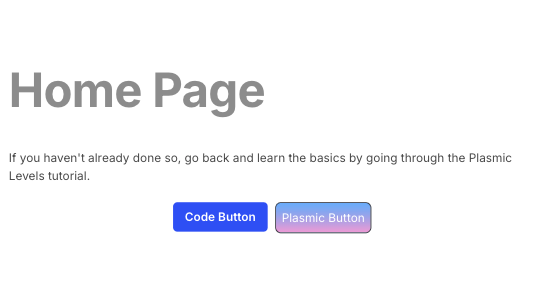
But in synced code the button styles don’t get loaded:

I can see in generated code that it creates PlasmicPlasmicButton.css, which gets used inside PlasmicPlasmicButton__HeadOptions, but PlasmicPlasmicButton__HeadOptions don’t seem to be called by anything else.

Note: this doesn’t happen with Next.js app – all styles get pulled correctly.


Also, there are some integration issues being logged:

A props object containing a "key" prop is being spread into JSX:
  let props = {key: someKey, property: ..., content: ..., suppressHydrationWarning: ...};
  <meta {...props} />

This happens here:

export const Route = createFileRoute("/")({
  head: () => ({
    meta: [...PlasmicHome__HeadOptions.meta],
    links: [...PlasmicHome__HeadOptions.links]
  }),
  component: Home
});

And also this:

[tanstack-router] These exports from "/Users/iby/Development/Bitwild/Plasmic+Fresh/src/routes/index.tsx" will not be code-split and will increase your bundle size:
- Home
For the best optimization, these items should either have their export statements removed, or be imported from another location that is not a route file.

To work around this I need to edit generated code and do some hack around. But the issue with component styles seems pretty critical.

Project: Plasmic.

Let me know if I can help with any further details. Would be great to get TanStack working properly.

Hi @ian_bytchek, thanks for pointing that out. This is already on our radar, and we’ll be addressing it in a future update.

Hi @ian_bytchek we recently pushed an update that that improves integration of TanStack with generated code. If you update the Plasmic CLI to the latest version and sync again, the style issues should be fixed.

1 Like

Cheers! Will give it a go and let know if there are any issues! :folded_hands:

1 Like

Hey @samuel_pullman, just tried with CLI v0.1.348 and all other packages updated to their latest versions, and afraid it still looks the same – the component created in Plasmic isn’t picking up its own styles, like on the image before. I’m using default generated pages (regenerated just now) with file router – everything is basically “as default as possible”.

The errors about “key” prop also remain.

A props object containing a "key" prop is being spread into JSX:
  let props = {key: someKey, property: ..., content: ..., nonce: ..., suppressHydrationWarning: ...};
  <meta {...props} />
React keys must be passed directly to JSX without using spread:
  let props = {property: ..., content: ..., nonce: ..., suppressHydrationWarning: ...};
  <meta key={someKey} {...props} />

Let me know if you need any further details. Would be awesome to get this sorted! :folded_hands:

Hey @ian_bytchek

Could you share the content of PlasmicHomepage.tsx to verify if it gets the latest generated code in the existing project after doing the sync with the latest cli?

Additionally, are you also able to reproduce the issue while creating new project from cli?