Custom Validation Using API Calls - Overloads OnChange if Using Barcode Scanner

I was using custom validation with API calls just fine using the onChange of the form until a barcode scanner was used on a field. The barcode scanner rapidly types the barcode data and overloads the calls. There are 5 database calls using a custom function per character typed, so the validation completes before the OnChange actions do. For the long barcodes we use, the data takes several seconds to arrive, since it is queued.

I tried putting the code directly into the Custom Validation field rather than using state variables, but it also finishes the validation before the data is returned. The preview just says “Promise {}” so that should have been my hint.

I’m using a custom fetch function, but it essentially is just a fetch wrapper:

let serialNo0 = $state.formNewEntry?.value?.serialNo ?? "N/A";
let serialNo = serialNo0 === "" ? "N/A" : serialNo0;
let result0 = serialNo === "N/A" ? { "data": [] } : await $$.getFetch("http://127.0.0.1:3006/api/t/Postings", {
  "select": "id",
  "order": "id.desc",
  "limit": 1,
  "status": 5,
  "station": $ctx.params.s,
  "serialNo": serialNo
});
let result1 = await result0 ?? { "data": [] };
let result = (await result1.data?.length ?? 0) == 0;
return result;

When I put an alert() on it, it returns false or true as expected, but the validation doesn’t fire. I’ve tried with and without the “await”.

If I had to guess, the problem is that there is no pre-validation hook, and the custom validation just reads and processes existing data in memory. What I’d like is either…

  1. Be able to use async functions in custom validation
  2. Have an “on validation” interaction hook that fires before the validation.
  3. A workaround that functions the same to the user: field loses focus, validation updates.

I don’t think I can do the first two, nor is my solution working for barcode scans, which is frustrating.
Hey @EmCmNeDt

Can you please share your project id and the component where this custom validation code exists?

Thanks

I cannot, but would you like any screenshots or more snippets?

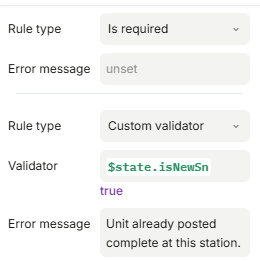
Here is the custom rule:

Here is a snippet from the custom registered function:

async function requestJson(
  method: "GET" | "POST" | "PUT" | "DELETE",
  url: string,
  body?: JsonValue,
  headers?: HeadersMap,
  timeout: number = defaultTimeoutMs,
  params?: JsonRecord
): Promise<ApiObject> {
  const controller = new AbortController();
  const timeoutId = setTimeout(() => controller.abort(), timeout);

  try {
    const finalUrl = method === "GET" ? appendQuery(url, params) : url;
    const mergedHeaders: HeadersMap =
      headers != null ? { "Content-Type": "application/json", ...headers } : defaultJsonHeaders;

    const init: RequestInit = { method, headers: mergedHeaders, signal: controller.signal };
    if (method !== "GET" && body) init.body = JSON.stringify(body);

    const res = await fetch(finalUrl, init);
    if (!res.ok) {
      const msg = (await res.text().catch(() => "")) || `HTTP ${res.status}`;
      return toErrorObject(msg, res.status);
    }

    const contentType = res.headers.get("Content-Type") || "";
    if (contentType.includes("application/json")) {
      return toObject((await res.json()) as JsonValue);
    }
    return toObject(await res.text());
  } catch (err) {
    if (err instanceof DOMException && err.name === "AbortError") {
      return toErrorObject(`Request timed out after ${timeout} ms`);
    }
    if (err instanceof Error) {
      return toErrorObject(err.message || "Request failed");
    }
    return toErrorObject("Request failed");
  } finally {
    clearTimeout(timeoutId);
  }
}

export function getFetch(
  url: string,
  params?: JsonRecord,
  timeout?: number,
  headers?: HeadersMap
): Promise<ApiObject> {
  return requestJson("GET", url, undefined, headers, timeout, params);
}

// Overloads
export function postFetch(url: string, body?: JsonValue, timeout?: number, headers?: HeadersMap): Promise<ApiObject>;
export function postFetch(url: string, bodies: JsonValue[], timeout?: number, headers?: HeadersMap): Promise<ApiObject>;

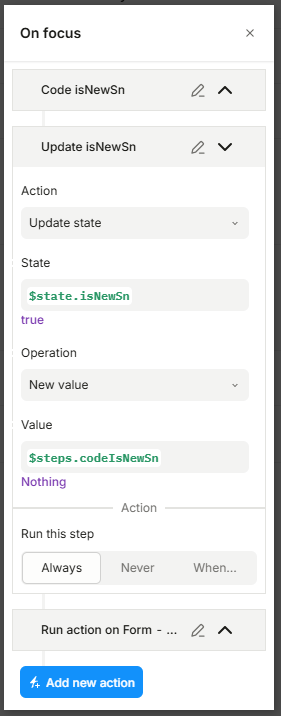
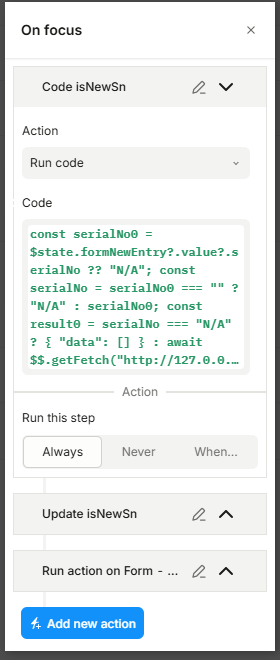
There is good news… I just found a workaround. The “On Focus” interaction for the parent container is an approximate approach. Too bad there isn’t an “On unfocus” or something, but this works close enough that I don’t think the end user will notice if I duplicate the same Run Code 2-4x (1-3x areas of potential focus + pre-submission). Too bad $dataTokens can’t use $state vars, because that’s a lot of duplication to keep track of… open to better ideas…

And since there are 5x of these, I just have to do this 15-20 times. I’m not looking forward to it.

Update: If I put the “On Focus” interaction on the main container, even clicks within the container or “tabs” within the container fire off the interaction, meaning I only have to put the code in one place: the main form.

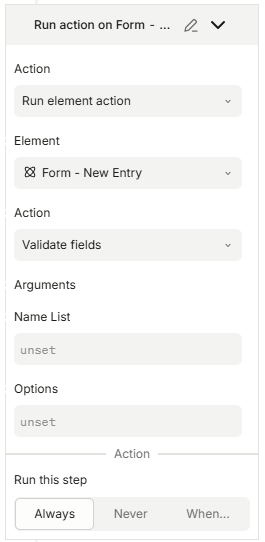
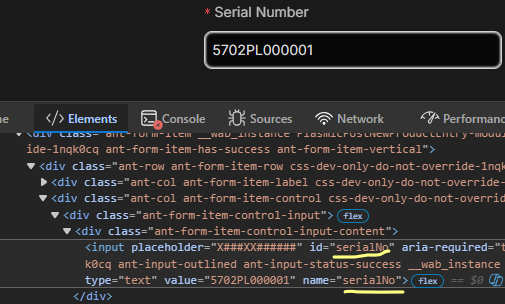
Now I have a different problem. Turns out, validation still triggers before the focus event, so I need to use an Action to trigger the validation of the individual fields. I thought it was as simple as putting the element id or name in a list… but that’s not the case.

This person seems to have the same problem: Validate form fields as element action through a button outside the form - Issues - Plasmic Community maybe?

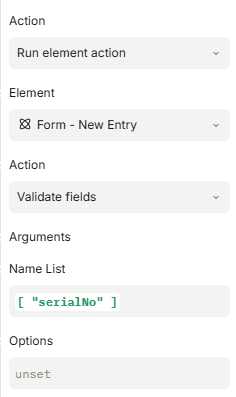
I also tried without the brackets.

UPDATE: The validation never fired because I was using a “Run this step” guard. The guard relied on two run codes like the one above to return falsey in order to work, but the problem was that it didn’t and returned a truthy… every single time. Like the validation the normal way, it is too impatient and doesn’t actually wait for the Run Codes to finish. Now, I’m not exactly sure how to fix this next problem… but at least I know I got the syntax right.

UPDATE 2:
Just figured out grouped items, if anyone wants to know:

["parts"] w/ Option { "recursive": true }

OR…

[["parts", "part_0"],["parts","part_1"]]

@EmCmNeDt hi! the „on unfocus” event is called „on blur”, can you see if it will fix your case?

but ideally you need the „debounce” function

i believe we have it somewhere in the insert panel, probably as part of a lodash library. The idea is that you should wrap your code in that deboune function, and it will only be executed once every X seconds with the last input value

you can search online for visuals to better understand how this works

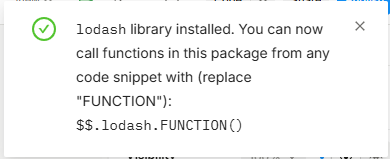
I installed Lodash:

Then I updated the validation of the field with a delay:

async function chkSn() {
  return !$steps.updateIsNewSn || !$steps.updateIsLineSn
}
$$.lodash.debounce(chkSn, 2000)

It seems to work now. However, this just adds a delay, it doesn’t truly wait for an action to complete. Is there a way to do that instead?

@EmCmNeDt There was a topic with similar question about awaiting for async functions to finish in the chained interactions - see example here Problem report — Plasmic : Inconsistent behavior when chaining - #2 by alex_noel

1 Like

I like that solution, and usually it works. The trouble is that the step returns falsey if it isn’t completed yet when the “Run this code” fires. I’d like it to wait for the pre-req to finish.

Thank you everyone for your help. I found the “on blur” and lodash especially helpful tricks.

1 Like