Page is not loading Server side.

What are you trying to do? (please be as specific as possible and include relevant screenshots, code snippets)

I have created a code component with some data fetching logic and registered it on plasmic.

Then i have created a page on plasmic.

Now i have created a setup for SSR in my code base but page is not loading server side. When i am using PlasmicRootProvider by passing loading={PLASMIC} then i am getting.

Error: Only plain objects, and a few built-ins, can be passed to Client Components from Server Components. Classes or null prototypes are not supported.

What are the reproduction steps?

Relevant links:

@lokesh_mudgal Hi!
I need some additional input to help you with this one:

  1. Can you send us your project ID?

  2. Is it possible that somewhere in your component, you have use server clause on top of the file?

  3. Can I see the code sample? (You can omit the behavior of the component itself; I’m interested in the return value and the way you instantiate it)

  4. Are you using create-plasmic-app or trying to set up Plasmic in existing codebase?

@alex_noel Thanks for the response

  1. Sorry i can’t send the project id
  2. no
  3. This is my code component, which is i am registering on Plasmic
    1. import React from "react";
      
      import { DataProvider, usePlasmicQueryData } from "@stadium/services/plasmic";
      
      import { getCachedMenuData } from "@server/api";
      
      import styles from "./main.module.scss";
      
      interface MenuFetcherContainerProps {
        children: React.ReactNode;
        className?: string;
        storeNumber: string;
        countryCode: string;
        visibleCategoryCount?: number;
        showAllCategories?: boolean;
        overrideSlugs?: string[];
      }
      
      const MenuFetcherContainer = (props: MenuFetcherContainerProps) => {
        const menuProps = {
          fullMenu: true,
          store: { number: props.storeNumber || "ABC1234" },
          country: { iso: props.countryCode?.toUpperCase() || "US" },
          isNewShopCreationFlow: false,
        };
      
        const { data, isLoading } = usePlasmicQueryData("/menu", async () => {
          const { data: cacheMenuData } = await getCachedMenuData(menuProps);
          const categorySlugs = cacheMenuData?.menu?.menuItems?.map((item: any) => item.code) || [];
          return { categories: cacheMenuData?.menu?.menuItems || [], categorySlugs };
        });
      
        return (
          <div className={`${styles.menuFetcherContainer} ${props.className}`}>
            {isLoading && <div>Loading...</div>}
            {data && (
              <DataProvider
                name="menu"
                data={{
                  ...data,
                  showAllCategories: props.showAllCategories,
                  visibleCategoryCount: props.visibleCategoryCount,
                  overrideSlugs: props.overrideSlugs,
                }}
              >
                {props.children}
              </DataProvider>
            )}
          </div>
        );
      };
      
      export default MenuFetcherContainer;
      
      
    2. PLASMIC.registerComponent(MenuFetcherContainer, {
        name: "MenuFetcherContainer",
        isDefaultExport: true,
        providesData: true,
        importPath: "@components/swagmagic/slices/menu-fetcher-container",
        props: {
          children: {
            type: "slot",
            defaultValue: {
              type: "text",
              value: "Add your UI elements here",
            },
          },
          className: {
            type: "string",
          },
          storeNumber: {
            type: "string",
            defaultValue: "",
          },
          countryCode: {
            type: "string",
            defaultValue: "US",
          },
          showAllCategories: {
            type: "boolean",
            defaultValue: false,
            defaultValueHint: true,
          },
          overrideSlugs: {
            type: "array",
            defaultValue: [],
          },
        },
      });
      
    3. the ‘[[..catchAll]/page.js’ file

    4. import { notFound } from "next/navigation";
      
      import { PlasmicComponent, PLASMIC } from "@stadium/services/plasmic";
      
      import { PlasmicClientRootProvider } from "@client/plasmic-client";
      
      export const dynamic = "force-static";
      
      export async function generateMetadata({ params }) {
        const plasmicComponentData = await fetchPlasmicComponentData(params?.catchAll);
        const prefetchedData = plasmicComponentData?.prefetchedData;
      
        if (!prefetchedData || prefetchedData.entryCompMetas.length === 0) {
          return {
            title: "Page Not Found",
          };
        }
      
        const pageMeta = prefetchedData.entryCompMetas[0];
      
        return {
          title: pageMeta.pageMetadata?.title,
        };
      }
      
      export default async function PlasmicLoaderPage({ params, searchParams }) {
        const plasmicComponentData = await fetchPlasmicComponentData(params?.catchAll);
        const prefetchedData = plasmicComponentData?.prefetchedData;
      
        if (!prefetchedData || prefetchedData.entryCompMetas.length === 0) {
          notFound();
        }
      
        const pageMeta = prefetchedData.entryCompMetas[0];
        return (
          <PlasmicClientRootProvider
            prefetchedData={prefetchedData}
            pageParams={pageMeta.params}
            pageQuery={searchParams}
          >
            <PlasmicComponent component={pageMeta.displayName} />
          </PlasmicClientRootProvider>
        );
      }
      
      async function fetchPlasmicComponentData(catchall) {
        const plasmicPath = "/" + (catchall ? catchall.join("/") : "");
        const prefetchedData = await PLASMIC.maybeFetchComponentData(plasmicPath);
        if (!prefetchedData) {
          return null;
        }
      
        return { prefetchedData };
      }
      
      
    5. plasmic-client.jsx

      "use client";
      
      import { PLASMIC, PlasmicRootProvider } from "@stadium/services/plasmic";
      
      import MenuFetcherContainer from "@components/swagmagic/slices/menu-fetcher-container";
      
      // You can register any code components that you want to use here; see
      // https://docs.plasmic.app/learn/code-components-ref/
      // And configure your Plasmic project to use the host url pointing at
      // the /plasmic-host page of your nextjs app (for example,
      // http://localhost:3000/plasmic-host).  See
      // https://docs.plasmic.app/learn/app-hosting/#set-a-plasmic-project-to-use-your-app-host
      
      PLASMIC.registerComponent(MenuFetcherContainer, {
        name: "MenuFetcherContainer",
        isDefaultExport: true,
        providesData: true,
        importPath: "@components/swagmagic/slices/menu-fetcher-container",
        props: {
          children: {
            type: "slot",
            defaultValue: {
              type: "text",
              value: "Add your UI elements here",
            },
          },
          className: {
            type: "string",
          },
          storeNumber: {
            type: "string",
            defaultValue: "",
          },
          countryCode: {
            type: "string",
            defaultValue: "US",
          },
          showAllCategories: {
            type: "boolean",
            defaultValue: false,
            defaultValueHint: true,
          },
          overrideSlugs: {
            type: "array",
            defaultValue: [],
          },
        },
      });
      
      /**
       * PlasmicClientRootProvider is a Client Component that passes in the loader for you.
       *
       * Why? Props passed from Server to Client Components must be serializable.
       * https://beta.nextjs.org/docs/rendering/server-and-client-components#passing-props-from-server-to-client-components-serialization
       * However, PlasmicRootProvider requires a loader, but the loader is NOT serializable.
       */
      export function PlasmicClientRootProvider(props) {
        return <PlasmicRootProvider loader={PLASMIC} {...props}></PlasmicRootProvider>;
      }
      
      
  4. I have integrated Plasmic into my existing project; it was not created using create-plasmic-app.

I have added this component to one of my pages and populated its children using repeatElement based on the data. The component registers correctly in the Plasmic editor, but when I place it on a Plasmic-created page, it does not render on the server side. I want the entire page, including this component and its data, to load on the server side.

i have shared almost everything related plasmic i have in my project.

Please help me load the page (created in the Plasmic editor) on the server side.

@lokesh_mudgal It’s difficult to say exactly what’s causing this, but here are a few things you can try:

  • Remove component registration in your code component, it should only be registered once in plasmic-init-client.tsx (or plasmic-client.tsx, in your case)
  • Make sure you are initializing plasmic in a server-safe way, e.g. a simple plasmic-init.ts looks like:
  import { initPlasmicLoader } from "@plasmicapp/loader-nextjs/react-server-conditional";
  import * as NextNavigation from "next/navigation";

  export const PLASMIC = initPlasmicLoader({
    nextNavigation: NextNavigation,
    projects: [
      {
        id: "your-project-id",
        token: "your-project-token",
      },
    ],
    preview: true, // Set to false in production
  });
  • Make sure you’re using the server safe PLASMIC in your catchall
  • Basically, component registration must happen in a client component, and the loader instance should never be passed as a prop from server to client
    components.

@samuel_pullman @alex_noel

Let me try to explain structure again.

main-repo/

├── package.json

├── packages/

│ ├── services/

│ │ └── plasmic/index.ts

│ ├── my-packge

│ │ └── src/

│ │ ├── client/

│ │ │ ├── plasmic-client.jsx

│ │ │ └── plasmic-canvas-wrapper.jsx

│ │ ├── app/

│ │ │ └── (withProviderRoutes)/

│ │ │ └── @swagmagic/

│ │ │ ├── plasmic-host/

│ │ │ │ └── page.js

│ │ │ └── [[…catchAll]]/

│ │ │ └── page.js

│ │ ├── components/

│ │ │ └── swagmagic/

│ │ │ └── slices/

│ │ │ └── menu-fetcher-container/

│ │ │ └── index.tsx

│ │ ├── constants/

│ │ │ ├── config.js

│ │ │ └── routes.js

└── yarn.lock

  • Core Plasmic Service → `packages/services/plasmic/index.ts`
    1. import { initPlasmicLoader } from "@plasmicapp/loader-nextjs/react-server-conditional";
      
      export const PLASMIC = initPlasmicLoader({
        projects: [
          {
            id: *****,
            token: *****,
          },
        ],
        // Fetches the latest revisions, whether or not they were unpublished!
        // Disable for production to ensure you render only published changes.
        preview: process.env.NODE_ENV === "development",
      });
      
      export {
        PlasmicComponent,
        PlasmicRootProvider,
        PlasmicCanvasHost,
        DataProvider,
        usePlasmicQueryData,
      } from "@plasmicapp/loader-nextjs";
      
  • Plasmic Client Configuration
  • `packages/my-package/src/client/plasmic-client.jsx`
  • code already shared in last message, basically doing Registers custom components (e.g., `MenuFetcherContainer`) and Exports `PlasmicClientRootProvider` wrapper component.
  • Plasmic Canvas Wrapper
    • `packages/my-package/src/client/plasmic-canvas-wrapper.jsx`
    • "use client";
      
      import { PlasmicCanvasHost } from "@main-repo/services/plasmic";
      
      // Import plasmic-client to ensure component registration happens
      import "./plasmic-client";
      
      /**
       * Client-side wrapper for PlasmicCanvasHost
       * This ensures all code components are registered when the Plasmic editor loads
       */
      export function PlasmicCanvasWrapper() {
        return <PlasmicCanvasHost />;
      }
      
      
      • Client-side wrapper for `PlasmicCanvasHost`.
      • Ensures component registration when Plasmic editor loads.
    • Plasmic Host Page
      • `packages/my-package/src/app/(withProviderRoutes)/@swagmagic/plasmic-host/page.js`
    • Plasmic Catch-All Route
      • `packages/my-package/src/app/(withProviderRoutes)/@swagmagic/[[...catchAll]]/page.js`
    • Custom Plasmic Component
      • `packages/my-package/src/components/swagmagic/slices/menu-fetcher-container/index.tsx`

Please let me know if you get anything now with all the info. it will be very helpful.

  1. Create an app through create-plasmic-app (page router)
  2. Register a component with the following code:
import React from "react";
import { DataProvider, usePlasmicQueryData } from "@plasmicapp/loader-nextjs";

// Fake async data fetching function
async function fetchData() {
  return new Promise<string>((resolve) => {
    setTimeout(() => {
      resolve("Fetched data from server!");
    }, 1000); // 1 second delay
  });
}

// Server Component
export function DataFetchingComponent(props: {
  children?: React.ReactNode;
}) {
  const data = usePlasmicQueryData('fetchedDataKey', async () => {
    return await fetchData();
  });

  return (
    <DataProvider name="fetchedData" data={data}>
        <h2>Server Component Data Fetching Example</h2>
        {props.children}
    </DataProvider>
  );
}

Registration:


PLASMIC.registerComponent(DataFetchingComponent, {
  name: "DataFetchingComponent",
  providesData: true,
  props: {
    children: "slot",
  },
});
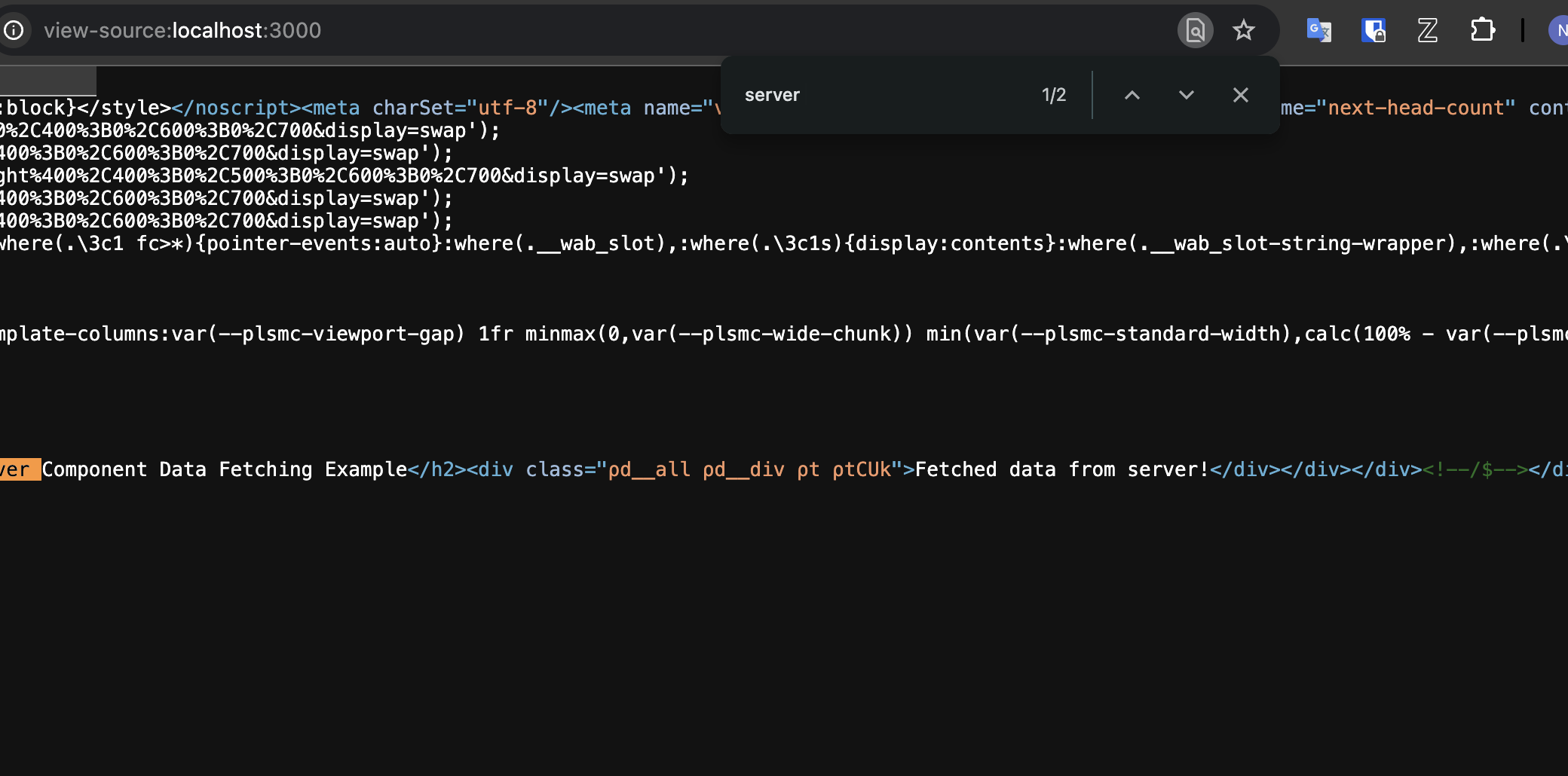
  1. Test it – all the data should be in the page source:

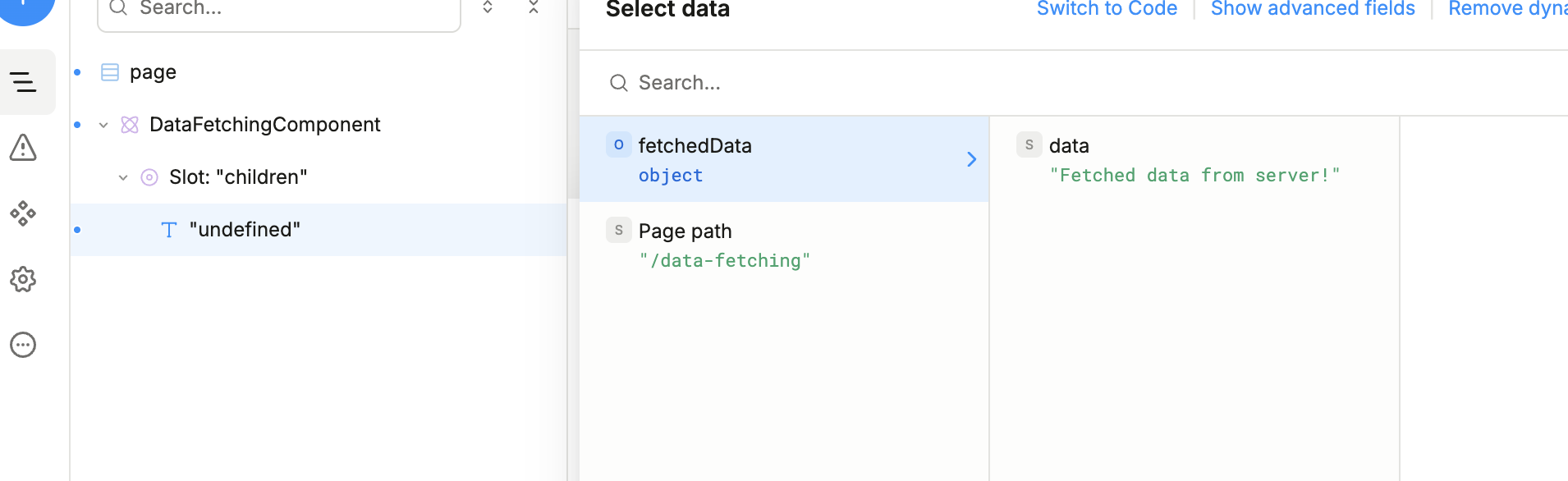
and it should be available in the studio: