What are you trying to do? (please be as specific as possible and include relevant screenshots, code snippets)
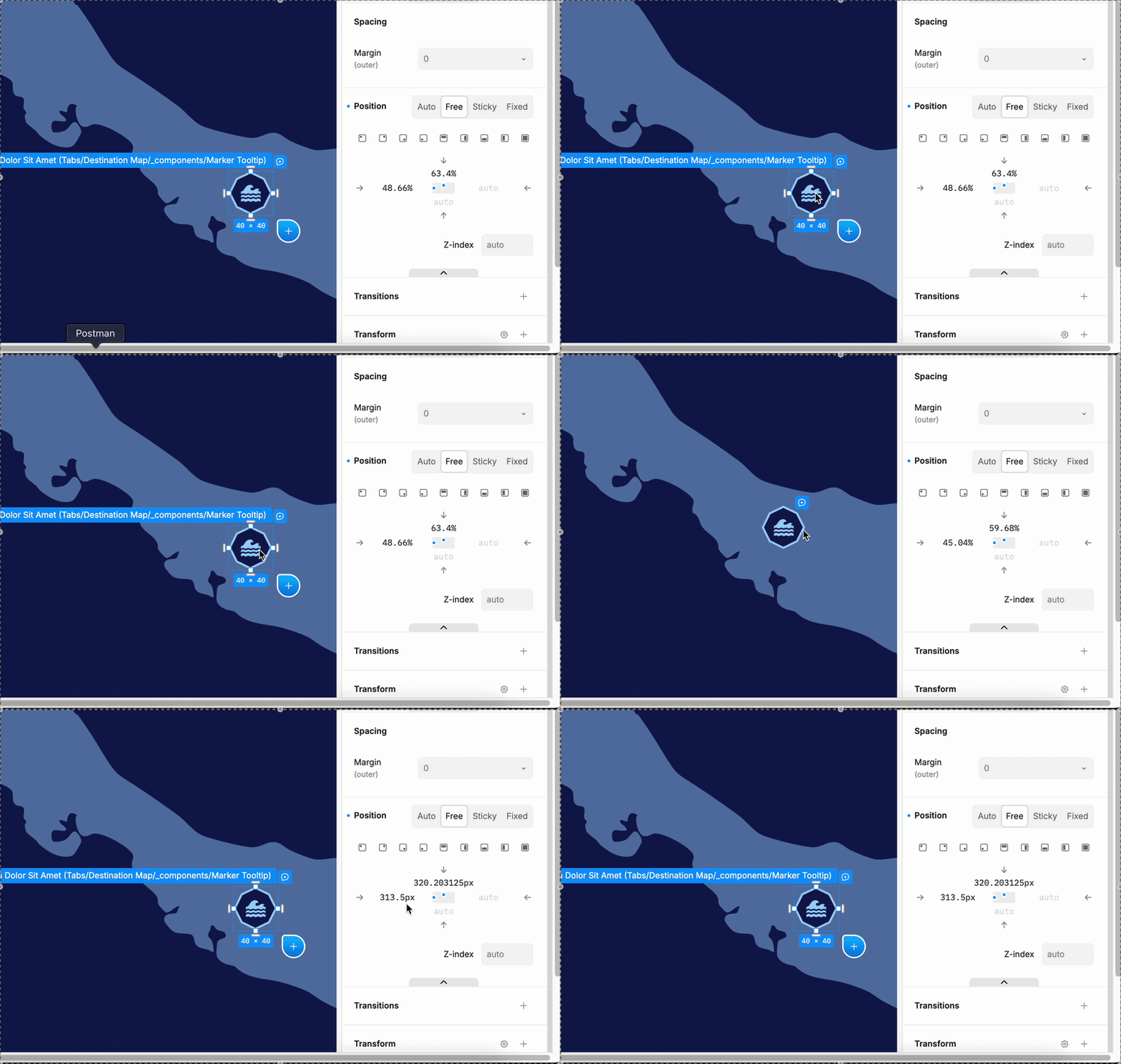
Position markers absolutely inside a slot of our own code component, in % so each marker lands correctly at every breakpoint (the map stage is a different size per breakpoint).
Dragging a marker on the canvas rewrites the percentages as pixels, silently:
before   left: 48.66%    top: 63.4%
after    left: 214.5px   top: 229.203125px
214.5px is the same position at the current stage size, so after one drag the marker is only correct at that one width. It rewrites the base values, so a desktop drag breaks the other breakpoints too.
It looks like a bug rather than intended behaviour because the unit survives when the parent is a Plasmic container — same component, same panel, same stage:
-
marker is a direct child of the code component’s slot → drag writes
left: 214.5px; top: 229.203125px -
marker wrapped in a free box (
position: relative; width: 100%; height: 100%) in that same slot → drag writesleft: 58.58%; top: 27.42%
The slot’s own box isn’t the cause: the code-component instance already has position: absolute; left: 0; top: 0; width: 100%; height: 100%.
Expected: a value the author entered as % stays % after a drag or copy-paste and or duplicate element. Failing that, compute % when the parent has a definite size, which a slot filling its parent does.
What are the reproduction steps?
-
Register a code component that renders a
<div>with achildrenslot:registerComponent(Panel, { name: 'Panel', importPath: './Panel', props: { children: { type: 'slot' } }, }); -
Put a
Panelin a free container of fixed size (e.g. 800×400); set the instance toposition: absolute; left: 0; top: 0; width: 100%; height: 100%. -
In the Panel’s slot, add a box:
position: absolute; left: 40%; top: 40%. Confirm the Position fields read40%. -
Drag it a short distance → fields now read px.
-
Contrast: in the same slot, add a free box at
width: 100%; height: 100%, put another absolute box inside it at40% / 40%, drag that one → stays%.
Relevant links:
- Project / branch: <studio.plasmic.app URL> /
- Host: Next.js 14 App Router,
@plasmicapp/loader-nextjs2.0.17,@plasmicapp/host^2.0.11
GIF: