Hi Sarah, thank you so much for your reply!
I’ve created a minimal example that reproduces the issue without Stripe.
- I created a simple POST request to
http://localhost:3000/api/echo that echoes back the request body.
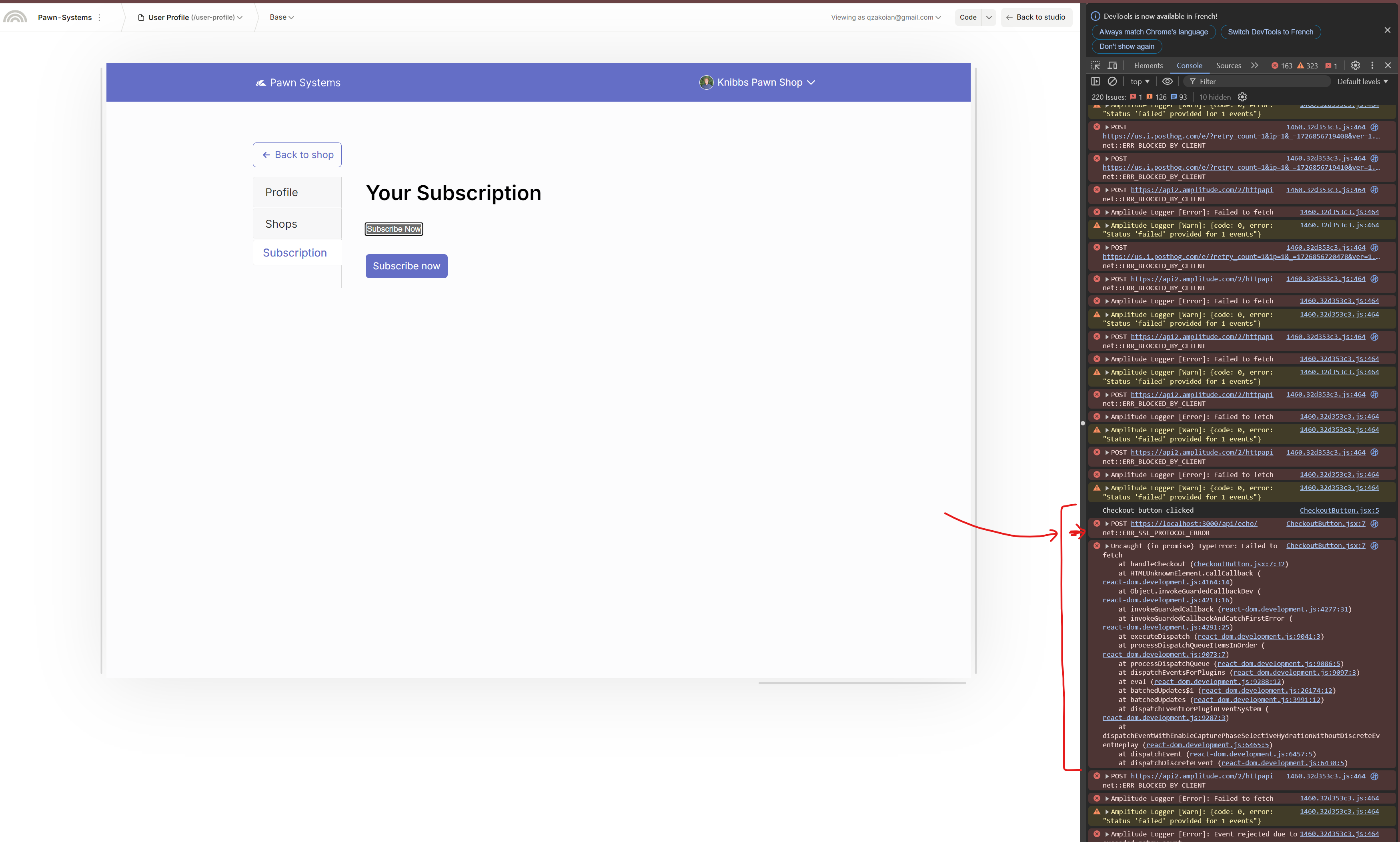
- In Plasmic Studio Preview Mode, the POST request is still being forced to
https://localhost, resulting in the ERR_SSL_PROTOCOL_ERROR.
You can see this issue in the minimal project:
- POST endpoint:
/api/echo
- Project ID:
4WayTwhC5fXHbkHxbvoXQQ
Here is my file pages/api/echo.js
export default function handler(req, res) {
    if (req.method === 'POST') {
      // Echo back the request body as a response
      return res.status(200).json({ received: req.body });
    }

    return res.status(405).json({ message: 'Only POST requests allowed' });
  }
Here is my file components/CheckoutButton.jsx
import React from 'react';

const CheckoutButton = ({ label }) => {
    const handleCheckout = async () => {
        console.log("Checkout button clicked");

        const response = await fetch('http://localhost:3000/api/echo', {
          method: 'POST',
          headers: {
            'Content-Type': 'application/json',
            'Upgrade-Insecure-Requests': '0',
          },
          body: JSON.stringify({ message: 'Test POST request' }),
        });

        if (!response.ok) {
          console.error('Failed to send POST request:', response.statusText);
          return;
        }

        const data = await response.json();
        console.log("Response from /api/echo:", data);
      };

    return (
        <button onClick={handleCheckout}>
            {label || 'Send POST Request'}
        </button>
    );
};

export default CheckoutButton;
Here is my file pages/plasmic-host.jsx
import * as React from 'react';
import { PlasmicCanvasHost, registerComponent } from '@plasmicapp/react-web/lib/host';
import CSVUploadComponent from '../components/CSVUploadComponent.jsx';
import MappingComponent from '../components/MappingComponent.jsx';
import CSVFlowComponent from '../components/CSVFlowComponent.jsx';
import supabase from '../supabaseClient.jsx'; // Import the Supabase client
import CSVFlowComponentProducts from '../components/CSVFlowComponentProducts.jsx';
import MappingComponentProducts from '../components/MappingComponentProducts.jsx';
import { useEffect, useState } from 'react';
import CheckoutButton from '../components/CheckoutButton.jsx';


// You can register any code components that you want to use here; see
// https://docs.plasmic.app/learn/code-components-ref/
// And configure your Plasmic project to use the host url pointing at
// the /plasmic-host page of your nextjs app (for example,
// http://localhost:3000/plasmic-host).  See
// https://docs.plasmic.app/learn/app-hosting/#set-a-plasmic-project-to-use-your-app-host

// registerComponent(...)


registerComponent(CSVUploadComponent, {
  name: 'CSVUploadComponent',
  importPath: './components/CSVUploadComponent',
  props: {
    onParsedData: {
      type: 'eventHandler',
      argTypes: [
        {
          name: 'data',
          type: 'array',
        },
      ],
      description: 'Callback when CSV data is parsed',
    },
  },
});


registerComponent(MappingComponent, {
  name: 'MappingComponent',
  importPath: './components/MappingComponent',
  props: {
    csvData: {
      type: 'array',
      defaultValue: [],
      description: 'Parsed CSV data for mapping',
    },
    onMappingComplete: {
      type: 'eventHandler',
      argTypes: [
        {
          name: 'mapping',
          type: 'object',
        },
      ],
      description: 'Callback when mapping is completed',
    },
  },
});


registerComponent(MappingComponentProducts, {
  name: 'MappingComponentProducts',
  importPath: './components/MappingComponentProducts',
  props: {
    csvData: {
      type: 'array',
      defaultValue: [],
      description: 'Parsed CSV data for mapping',
    },
    onMappingComplete: {
      type: 'eventHandler',
      argTypes: [
        {
          name: 'mapping',
          type: 'object',
        },
      ],
      description: 'Callback when mapping is completed',
    },
  },
});


registerComponent(CSVFlowComponent, {
  name: "CSVFlowComponent",
  importPath: './components/CSVFlowComponent',
  importName: "CSVFlowComponent",
  isDefaultExport: true,
  props: {
    shopId: {
      type: 'string',
      defaultValue: '',
      description: 'Shop ID to be assigned to each customer',
    },
  },
});

// Register Product Flow Components
registerComponent(CSVFlowComponentProducts, {
  name: "CSVFlowComponentProducts",
  importPath: './components/CSVFlowComponentProducts',
  importName: "CSVFlowComponentProducts",
  isDefaultExport: true,
  props: {
    shopId: {
      type: 'string',
      defaultValue: '',
      description: 'Shop ID to be assigned to each product',
    },
  },
});

registerComponent(CheckoutButton, {
  name: 'CheckoutButton',
  importPath: '../components/CheckoutButton.jsx',
  props: {
    label: {
      type: 'string',
      defaultValue: 'Subscribe Now',
      description: 'The label text for the checkout button',
    },
  },
});


const PlasmicHost = () => {
  return <PlasmicCanvasHost />;
}


export default PlasmicHost;
And here is the error I get when I click the Custom CheckoutButton in the preview mode in Plasmic (the grey button):